Air-gapped Licensing
Some machines never touch the internet — ever. They can't call activate or verify, so the normal online flow doesn't apply. For these, an admin issues a perpetual, machine-bound license file out-of-band; the device verifies it entirely offline, forever.
This builds on the same signed token described in Offline Token Verification — read that first for the crypto and payload details. The difference here is how the token is issued: not by the device calling in, but by an admin minting a long-lived file you deliver by email or USB.
The flow
  air-gapped machine          you / admin                   Keygate
 ───────────────────         ─────────────                 ─────────
  1. show machine code  ──▶  2. receive it (phone/email)
                             3. issue offline token   ──▶   sign (Ed25519)
                        ◀──  4. deliver .lic file      ◀──  return token
  5. drop in license dir
  6. verify offline ✓ forever
- On the air-gapped machine, your app displays a machine code — a stable hardware identifier (see The machine code below).
- The customer reads it to you from another device (phone, email — not the air-gapped box).
- You issue the license in Keygate and generate a signed token bound to that machine code.
- You send them the resulting
.licfile. - They drop it into the app's license folder.
- The app verifies it locally against the embedded public key — no network, indefinitely.
Issuing a token
From the admin dashboard
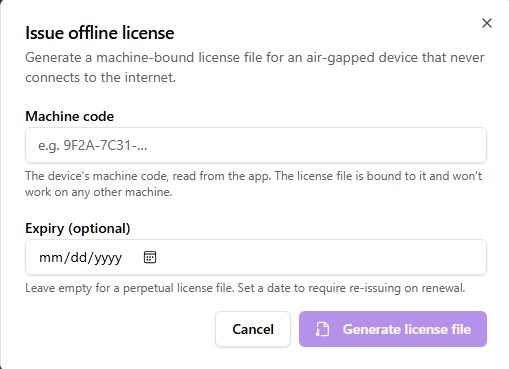
Open a license → Offline license. Enter the customer's machine code, leave Expiry empty for a perpetual file (or set a date to force re-issuing on renewal), and click Generate. Copy the token or Download .lic and send it to the customer.
The button appears only for active / trialing licenses.
From the API
POST /api/v1/admin/licenses/{id}/offline-token
Authorization: Bearer kg_live_…
Content-Type: application/json

{ "identifier": "<machine-code>", "expires_at": "" }
identifier— the device's machine code (required).expires_at— RFC 3339 timestamp, or empty/omitted for a perpetual token (the default for air-gapped installs).
Response:
{
  "token": "<base64url payload>.<base64url signature>",
  "fingerprint": "a1b2c3d4e5f6a7b8",
  "perpetual": true,
  "expires_at": ""
}
Deliver the token string to the customer as a file (e.g. yourproduct.lic). The fingerprint is included for support reference — it also lives inside the token as fpr.
Self-service from the customer portal
Customers can activate their own air-gapped machine without contacting you. In the portal, a license owner (or accepted seat) opens the license and chooses Activate offline device, enters the machine code, and downloads the .lic file — all from an internet-connected device, then sneakernets the file to the offline machine.
A license allows one self-service offline activation. Switching to a different machine requires an admin to clear the existing offline activation (the portal deliberately won't let the customer self-clear it) — so you keep a gate on machine moves. The option is hidden for SaaS products, which don't use device activation.

The machine code
The token is bound to the device by fpr = SHA256(identifier : product_id). For this to work:
- Your app computes a stable hardware identifier (e.g. a hash of volume serial + CPU/board ID) and displays it as the machine code the customer reads to you.
- At verify time the app recomputes the same identifier, derives
SHA256(identifier : product_id), and compares it to the token'sfpr. A mismatch means the file was issued for a different machine — reject it.
Pin the identifier algorithm down once and freeze it: if the value the customer reads to you differs from what the app recomputes later, every license breaks. This is the whole anti-copy mechanism — it's enforced client-side, since there's no server to check against.
Verifying on the device
Identical to the online case — see Offline Token Verification → Client verification steps. In short: embed the public key from GET /license/pubkey at build time, check the Ed25519 signature, confirm fpr matches this machine, and read ftr for feature gating. A perpetual token carries exp = 0, which Verify treats as never-expiring, so there is no clock check to satisfy.
Trade-offs to plan for
Offline licensing gives up things the online flow provides. These are inherent, not Keygate limitations:
- No revocation. Once a perpetual token is on a never-online machine, it's valid forever — there's no kill switch. If you need to be able to cut a device off, don't issue perpetual: set an
expires_atand re-issue on renewal. - Clock rollback defeats a bounded
expires_at(the user can set the system clock back). It does not affect perpetual tokens, since there's no expiry to bypass. For bounded tokens, optionally have the client persist a monotonic "last seen" timestamp and refuse if the clock jumps backward. max_activationsisn't enforced offline — there's no server to count against. Control it by issuing exactly one file per machine code.
Revocation and the reconnect gap
A common question: what happens when a device that's normally offline does get connected, and meanwhile the license was revoked or the machine was "moved" (its activation cleared and re-issued elsewhere)?
The answer depends entirely on whether your app re-checks with the server — the license file itself can't know anything changed.
The file alone: nothing changes. The .lic token is verified locally against the embedded public key (signature, exp, fpr). The server can't reach an offline machine, and a perpetual token never expires, so a server-side revoke or move has no effect while the app only trusts its local file. This is the inherent "no offline revocation" trade-off.
If the device reconnects and the app re-verifies online, the server state applies. On that verify call:
- License revoked / suspended / expired → the license is no longer usable → the endpoint returns
404 LICENSE_NOT_FOUND. - Activation moved (an admin cleared the offline activation and the customer activated a different machine) → this device's identifier no longer has an activation → also
404.
Both collapse to the same uniform 404 by design (so the endpoint can't be used to probe which keys are real). Your client can't distinguish "revoked" from "moved" from "never existed" — it just learns "not licensed anymore" and decides what to do: fall back to unlicensed, prompt re-activation, or run on a short grace window (grc).
Because self-service offline activations are recorded server-side, a move is visible on reconnect — the old machine's verify cleanly fails. Admin-issued perpetual tokens don't record an activation, so only a license-level revoke/suspend shows up, not a device move.
Design implications:
- Have the client re-verify opportunistically whenever it has connectivity, and treat a
404as a lapse. That is the only way a revoke or move ever reaches a rarely-online machine. - If remote revocation must actually take effect, don't issue perpetual. Use a bounded
expires_atso the file forces a re-check every TTL; a revoked or moved license then stops working at most one TTL after the device next connects — even if it was offline in between. Perpetual buys convenience; bounded buys enforceability. You can't have both.
Support renewal for air-gapped installs
Perpetual + paid support works here too, mapping cleanly onto perpetual fallback: the file the customer holds keeps the software running forever, while the support window (sup) gates newer releases. To renew, issue a new offline token with a later expires_at / refreshed support window and send the updated .lic file — the sneakernet equivalent of a support renewal.