Products & Plans
Keygate's data model is three layers: a product is the software you sell, a plan is a tier of that product, and a license is one customer's entitlement to a plan.
Product  (Inventor DXF Export, type: desktop)
  └── Plan  (Pro, subscription, max_activations: 3)
        ├── Entitlement  (dxf_export, quota, 20/day)
        └── License  (KG-XXXX-…, customer@example.com, status: active)
Products
A product represents one piece of software. Its type gates which capabilities its plans can use:
| Type | Activations (per-device) | Seats (per-user) | Release feeds |
|---|---|---|---|
desktop |
✅ | — | ✅ |
saas |
— | ✅ | — |
hybrid |
✅ | ✅ | ✅ |
The product type decides what capabilities exist; it's independent of the commercial model (a desktop product can still be sold as a subscription). Configuring a capability a product doesn't support (e.g. max_seats on a desktop plan) is rejected.
Other product fields:
minimum_supported_version— a semver floor embedded in update feeds so old clients can force-upgrade.require_signing— when true (the default), publishing a release fails unless an active signing key exists. Flip off only for intentionally unsigned builds (CI test artifacts).
Plans
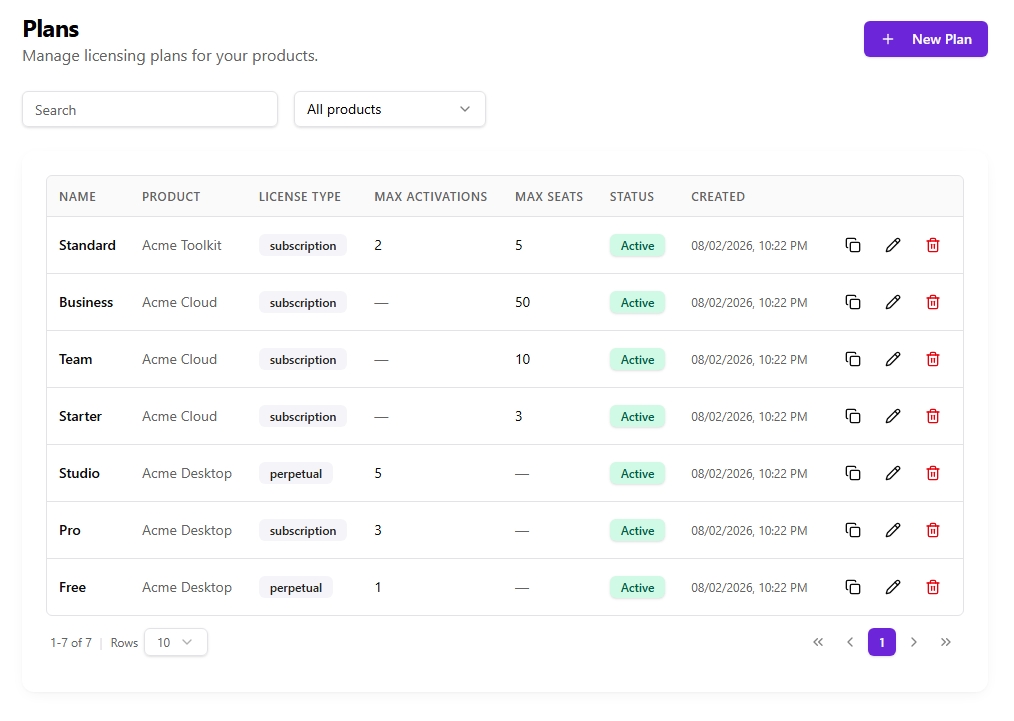
A plan is a purchasable tier. Its key fields:
| Field | Meaning |
|---|---|
license_type |
subscription, perpetual, or trial — see Licensing Models. |
license_model |
standard or floating (concurrent seat checkout). |
max_activations |
Devices a license may activate on. 0 = unlimited (where the product supports activations). |
max_seats |
Team members a license may invite (saas/hybrid). |
trial_days |
For trial plans, the trial length. New licenses get valid_until = now + trial_days. |
grace_days |
Days a license stays usable past valid_until before it's expired. Default 7. |
support_days |
Default paid-support window for new licenses. 0 = unlimited support. See The Support Window. |
stripe_price_id |
Stripe Price for buying this plan. |
support_renewal_price_id |
Stripe Price for a one-time support renewal. Empty = renewal not offered. |
checkout_id |
Short id used in the public checkout URL /pay/{checkout_id}. |
Entitlements
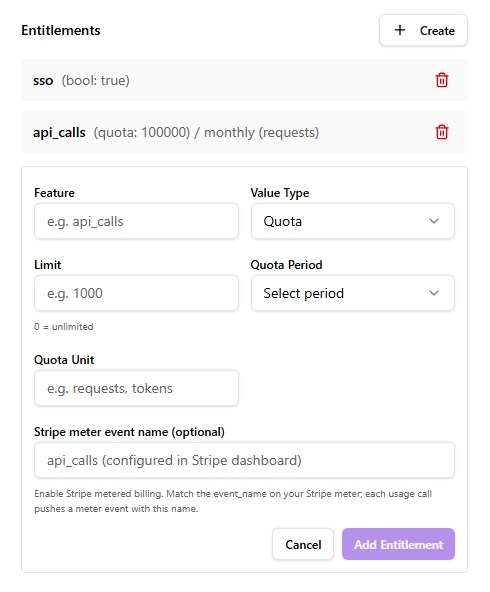
Entitlements attach capabilities to a plan. Each has a feature name and a value_type:
value_type |
Meaning | value holds |
|---|---|---|
bool |
A feature flag (on/off) | true / false |
int |
A numeric limit | the number |
string |
A configuration value | the string |
quota |
A metered usage cap | the numeric limit (e.g. 20) |
For a quota entitlement, additional fields apply:
quota_period—hourly,daily,monthly, oryearly. Counters reset automatically at the period boundary (UTC-based).quota_unit— a display label only (e.g.exports). Not the limit.
In the admin dashboard the Value field adapts to the chosen type — an Enabled/Disabled toggle for bool, a number field for int, and a numeric Limit field (with a 0 = unlimited hint) for quota — so the value is entered correctly without guesswork.
Quota limit goes in value, not quota_unit (API)
When creating entitlements directly via the admin API, put the numeric limit in value — not in quota_unit, and never leave it as true. Keygate parses the limit from value; a non-numeric value parses to 0, and a 0 limit is treated as unlimited, so the cap silently never fires. For a 20/day cap: value_type: quota, value: 20, quota_period: daily. (The dashboard's typed Value field prevents this — the warning applies to raw API use.)
Entitlements are returned to clients in the verify/activate response (features map) and embedded in the offline token. Quota entitlements are enforced by the usage metering endpoints.
Licenses
A license is created when a customer buys (via Stripe) or when you issue one through the admin API. Key fields beyond the plan link:
status—active,trialing,past_due,canceled,expired,suspended,revoked.valid_from/valid_until— the license's validity window.valid_untilempty = never expires (perpetual).support_until— the paid-support/updates window, independent ofvalid_until. See The Support Window.external_customer_id/external_workspace_id— opaque strings you own, for mapping Keygate licenses to your own user/tenant model.
The license lifecycle (expiry, grace, dunning) is driven by an hourly background checker; you can trigger it on demand with POST /admin/system/run-expiry-checks.